Roll-Down Points
When you map a UDC to a data group element it is important that it is mapped to the correct facility. If the element is specific to the device or the site in general, such as battery voltage, map it to the Device Facility; if it is specific to a Linked Facility, such as a meter, map it to the Linked Facility. Most points are based on this mapping. Roll-down Points are the exception.
A Roll-down Point is a basically a shadow point. It takes the data from the Device Facility and rolls it down to a point for a Linked Facility. In other words, the data group element is mapped to the Device Facility, but the point is for a Linked Facility.
A sample Roll-down Point is shown below. The Device Facility is MESA_RTU, and the Linked Facility is MESA, which is a meter. The data group element (Diagnostic65 Point) is mapped to the MESA_RTU but the Facility property of the point in the PNT is MESA_METER.
|
Roll-down Point example |
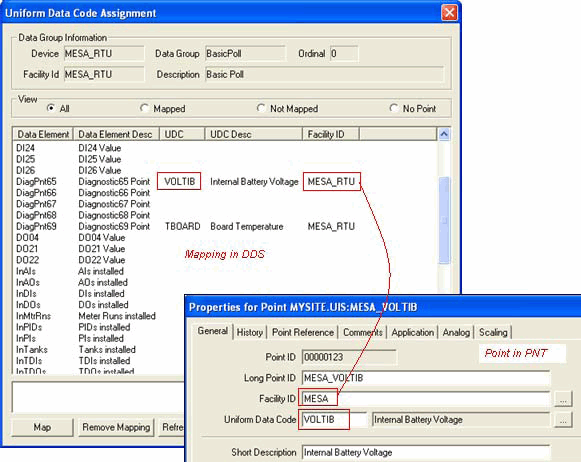
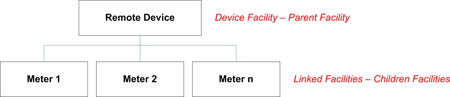
Roll-down points are allowed because of the parent-child relationship between a Device Facility and a Linked Facility. Data can be rolled from a parent to a child, but not from a child to child. See Device Facilities and Linked Facilities for more information.
|
Facility parent-child relationship |
Roll-down Points are useful for data group elements that you want to view the data in conjunction with multiple children facilities. For example, when you view meter data in CygNet Studio, you want to be able to see the battery voltage in conjunction with the operation data. This can be accomplished with a roll-down point.

